Introduction
To realize a Decision System,
it is not enough to simply separate
Signal (predictions, scores) and Decision.
As defined by the Decision Trace Model,
the “flow of decision-making” that lies between them
must be structured in a way that can actually be executed.
The OSS
Multi-Agent Orchestrator Core (GitHub link)
is an engine that implements this execution layer.
What It Can Do
This Orchestrator enables decision-making to be executed
as the following structured process.
1. Conditional Branching (Condition / Decision)
A simple example of conditional branching would be:
if risk_score > 0.8:
 reject
else:
 approve
In practice, decisions must consider:
- current state
- combinations of multiple conditions
- exception handling
- downstream processing flows
For example:
- risk score
- amount thresholds
- customer attributes
- historical behavior
- presence of human review
These are evaluated together to branch into actions such as:
- approve
- reject
- hold
- escalate
- request additional information
Example of a composite decision
def decide_application(ctx):

 if ctx.risk_score > 0.9 and ctx.amount > 1_000_000:

 return "reject"

 if ctx.risk_score > 0.7:
 if ctx.customer_tier == "VIP":
 return "manual_review"
 return "hold"

 if ctx.missing_documents:
 return "request_additional_info"

 if ctx.past_fraud_flag:
 return "manual_review"

 if ctx.risk_score < 0.3 and ctx.customer_tier == "trusted":
 return "auto_approve"

 return "approve"
This is not a simple if statement.
It combines:
- multi-condition evaluation
- state-dependent logic
- exception handling
- input validation
- auto-approval rules
More importantly, the decision result changes the subsequent workflow itself.
Thus, Decision is:
an explicit decision logic that includes
state dependency, multi-condition evaluation, and branching of subsequent processes.
Defining Decision as code means:
externalizing decision criteria as executable structure
instead of leaving them implicit in operations.
2. Explicit Boundaries (Boundary)
For example:
if confidence < 0.7:
 → human_review
It defines the scope of automation itself.
In real systems, AI should not always make final decisions.
When:
- confidence is low
- input is incomplete
- exceptions are significant
- impact is high
the process must stop and escalate to humans.
Boundary means:
defining where automation should stop and where control returns to humans, as executable rules.
Example:
if confidence < 0.7:
 route_to_human_review()
elif amount > 1000000:
 require_manager_approval()
elif input_missing_critical_field:
 request_additional_information()
else:
 proceed_automatically()
- Decision → what to do
- Boundary → whether it should be done automatically
Boundary is the safety guard of the entire Decision System.
3. Human Intervention (Human Gate)
human_gate → approve / reject
It defines human judgment as part of the system.
Key points:
- when to hand off to humans
- what humans evaluate
- what actions humans can take
- how results feed back into the system
Example:
if risk_score > 0.75 or exception_case:
 result = human_gate(
 reviewer="senior_analyst",
 options=["approve", "reject", "request_additional_info"]
 )
else:
 result = auto_approve()
- authority
- responsibility
- exception handling
- override capability
into the decision structure.
4. Asynchronous Execution (WAITING / Resume)
Some processes cannot complete immediately.
action → WAITING → resume
- API calls
- AI processing
- human approval
- external workflows
- event-based triggers
Instead of forcing synchronous execution,
WAITING is explicitly modeled.
Example:
result = call_external_risk_api(application)

if result.status == "pending":
 set_state("WAITING")
 save_resume_point("after_risk_api")
if current_state == "WAITING":
 resume(from_point="after_risk_api")
5. State Persistence
WAITING → save → load → resume
- execution position
- input data
- intermediate results
- next step
- waiting condition
Without this:
- results may change
- duplicate execution may occur
- human decisions may be lost
- traceability breaks
State is:
the continuity of decision-making itself.
6. Decision Trace (Trace)
Events are recorded as:
node.started
node.waiting
boundary.triggered
human_gate.approved
trace = [
 "application.received",
 "node.started:risk_check",
 "signal.generated:risk_score=0.82",
 "boundary.triggered:high_risk_case",
 "node.waiting:human_review",
 "human_gate.approved",
 "node.resumed",
 "action.executed"
]
It is:
the path of decision-making itself.
Multi-Agent Orchestrator Core
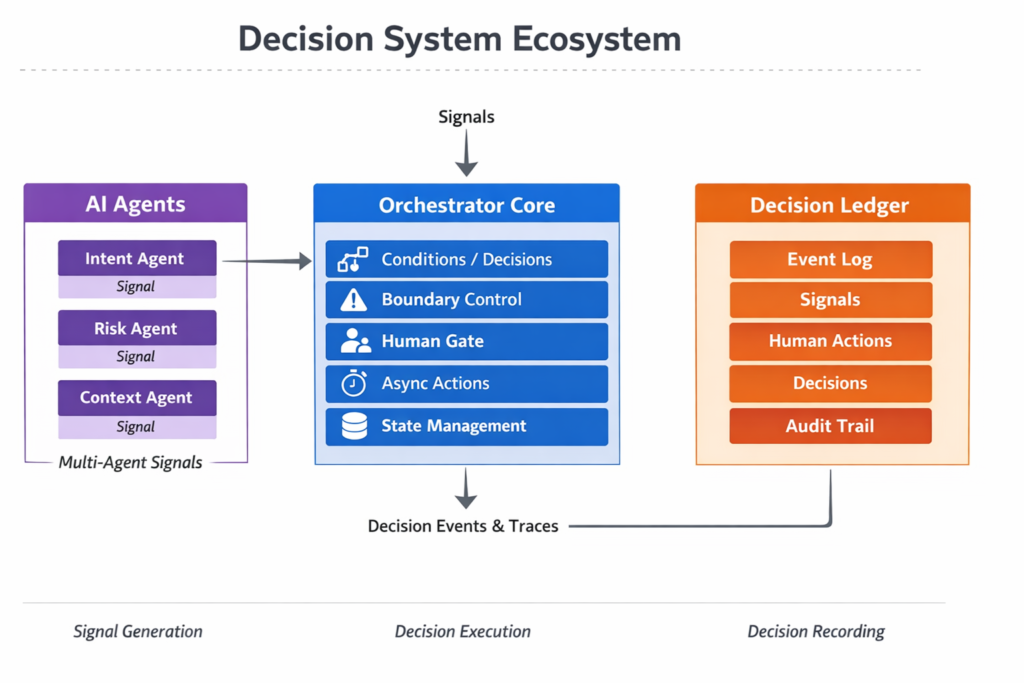
To implement a Decision System, we must integrate:
- Decision
- Boundary
- Human Gate
- WAITING / Resume
- State Persistence
- Trace
This Orchestrator unifies all of them into a single execution model.
Relationship with Multi-Agent
Agents do not make decisions.
They generate Signals from different perspectives:
- Intent
- Risk
- Context
Orchestrator:
- integrates Signals
- applies conditions
- controls boundaries
- routes to humans
- executes decisions
👉 Agents provide inputs.
Orchestrator makes decisions.
Relationship with Ledger
All decisions are recorded.
Ledger stores:
- Event
- Signal
- Decision
- Boundary
- Human actions
Properties:
- append-only
- tamper-resistant
- reproducible
Ledger is not a log.
It is:
a system that turns decision history into organizational assets.
Architecture

- Agent → generates Signals
- Orchestrator → executes decisions
- Ledger → records trace
At the same time, this architecture does not require a full implementation from the beginning.
A lightweight approach is also possible.
In simpler scenarios, the system can start with a minimal structure:
Event → Signal → Decision → Human → Log
Even without a full multi-agent setup, this Light configuration already enables:
– Signal generation (LLM or simple logic)
– Rule-based decision execution
– Human escalation
– Decision logging
The system can then be gradually extended to include more advanced components such as multi-agent evaluation and orchestration.
In other words, the structure remains consistent, while the implementation can evolve incrementally.

See detail in Lightweight DTM for Building “Decision-Capable AI”
What Changes
Before
- AI outputs scores
- humans decide
- logs are fragmented
- decisions are not reproducible
After
- decision flows are structured
- roles are separated
- boundaries are explicit
- human intervention is defined
- everything is recorded
👉 Decision becomes a system.
What Becomes Possible
1. Reproducibility
Why decisions happened can be traced.
2. Standardization
Reduces dependency on individuals.
3. Human-AI collaboration
Clear boundaries and responsibilities.
4. Distributed decision-making
Multiple agents integrated.
5. Auditability
Decisions become explainable.
Use Cases
1. Fraud Detection
Transaction → Risk Agent → Boundary → Human → Decision → Ledger
2. Customer Support
Inquiry → Intent → Complexity → Auto / Human
3. Manufacturing
Anomaly → Multi-Signal → Decision → Action
4. Retail
Demand → Policy → Human → Execution
Conclusion
AI can produce answers.
But it cannot execute and record decisions.
What is needed is:
- Agent (Signal generation)
- Orchestrator (Decision execution)
- Ledger (Decision recording)
Together forming a:
👉 Decision System
Decision Trace Model defines the structure.
Orchestrator executes it.
Ledger records it.
Only when these three are combined
does decision-making become a system.
👉 Multi-Agent Orchestrator Core (GitHub link)

Chinoba
Intelligence as Relationship
Research Platform
founded by
Masao Watanabe
AI Systems Architecture
Decision Trace
Human–AI Coordination
Algorithmic Governance
Related Research
This topic is part of the Chinoba Knowledge Base.

コメント