How Design Changes with Decision Trace Studio — And How to Build Designed Decisions into a Real System
Introduction
In many design processes, the final outputs are:
- Technical standards
- Design specifications
- Data
However, what is actually happening is not document creation, but decision-making.
- Which material to select
- Which design parameters to adopt
- Which constraints to prioritize
These accumulated decisions ultimately become documents.
Despite this, in traditional design:
Decisions are not externalized, and only documents remain.
Decision Trace Studio fundamentally changes this structure.
What is Decision Trace Studio?
Decision Trace Studio is:
An environment for designing, executing, and improving decisions
While traditional tools handle “documents” or “code,”
Decision Trace Studio handles:
Decisions themselves
In other words, it shifts the design target from:
- Documents
- Screens
- Implementation code
to:
- Decisions
- Branches
- Constraints
- Human intervention
- Logs
Traditional Design Flow (Technical Standards)
Let’s first look at the conventional design process:
- A design change occurs
- Engineers search past documents
- They decide based on personal experience
- A standard document is created
- It is revised through review
The problems are clear:
- Decision criteria are implicit
- Designs vary by person
- Reasons for decisions are not recorded
- Improvement is difficult
The final artifacts remain,
but the decision process that produced them does not.
Design Flow with Decision Trace Studio
With Decision Trace Studio, design proceeds as follows:
① Event: Define the starting point
Examples:
- A design change request occurs
- A new product design begins
Clarify:
What happened?
② Signal: Gather information for decisions
- Past design data
- Material properties
- Simulation results
- Quality standards
- Cost conditions
- AI-based similar design retrieval (optional)
Signal is:
The input for decision-making
Important:
AI is not mandatory.
Signals can come from search, simulation, rules, or human input.
③ Decision: Define technical choices
This is the core.
Decisions are defined as nodes:
Examples:
- Material selection → Aluminum / Steel / Resin
- Strength design → Safety factor 1.5 / 2.0
- Design policy → Lightweight / Strength-first
- Manufacturing method → Machining / Casting / Press
In other words:
Design becomes a collection of Decisions
④ Boundary: Apply constraints
- Regulations
- Safety standards
- Quality standards
- Manufacturing constraints
Check:
Is the decision within acceptable limits?
⑤ Human: Define human intervention
- Trade-off decisions
- Exception handling
- Final approval
Humans are:
Designed as part of the structure, not an afterthought
⑥ Execution: Generate outputs
- Generate design data
- Auto-generate technical documents
Outputs are:
Results of decisions, not just documents
⑦ Log: Record decisions
- Why was this material chosen?
- Why this parameter?
- Which constraints affected it?
This creates a structure where:
Decisions themselves become assets
What Changes with Decision Trace Studio?
① Design target changes
Traditional: Create documents
DTM: Design decisions
② Reproducibility emerges
Traditional: Depends on individuals
DTM: Same conditions → same decisions
③ Unit of improvement changes
Traditional: Edit documents
DTM: Improve decisions
④ Role of AI changes
Traditional: AI performs design
DTM: AI is part of Signal
Core Value of Decision Trace Studio
The most important value is:
The ability to visualize how changing decisions affects outcomes
Examples:
- Changing safety factors
- Changing materials and cost impact
- Tightening constraints and branch complexity
These can be compared as scenarios.
Studio is not just a design UI — it is a decision comparison environment
Why This Approach Matters
The essence is:
Designing decisions before AI
This enables:
- AI-independent design
- Incremental adoption
- Continuous improvement
But this is not the end.
What is designed in Studio must be:
Built into a real, executable system
How to Build Studio Designs into Real Systems
Three key implementations:
- Minimal Signal → Decision → Trace pipeline
- FastAPI + rules + trace output
- JSONL + snapshot logging
2. multi-agent-orchestrator-core
- Executes decision structures as workflows
- Supports: decision / condition / boundary / action / human_gate
- Pause/resume via external tasks
- Append-only decision logging
- Verification (verify_trace)
- Replay (replay_trace)
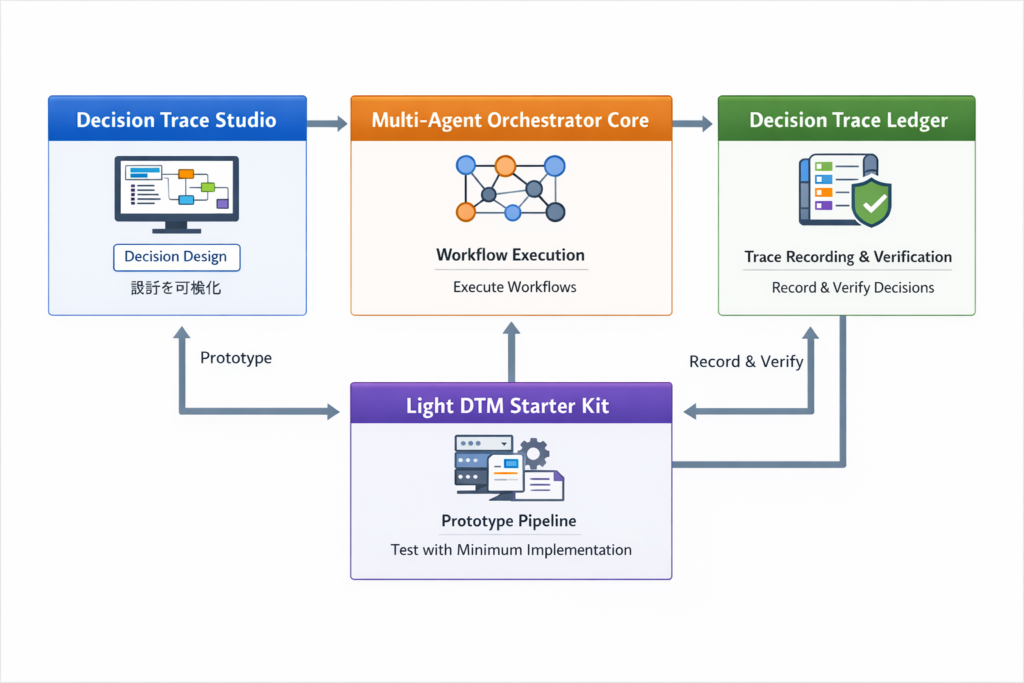
Overall Flow
- Design decisions in Studio
- Test with Starter Kit
- Execute via Orchestrator
- Record with Ledger
Step-by-Step Implementation
Step 1: Visualize decision structure in Studio
Define:
- Event
- Signal
- Decision
- Boundary
- Human
- Log
At this stage:
No AI or agents are required
Step 2: Build minimal pipeline (Starter Kit)
Convert to:
Signal → Decision API
Goal:
Input → Decision output works
Step 3: Convert to Orchestrator DSL
Map:
- Decision → decision node
- Branch → condition
- Constraint → boundary
- External process → action
- Human → human_gate
Key insight:
MAS is not about agents first — it is about executable decision structure
Step 4: Connect external systems via action nodes
Examples:
- CAE simulation
- Material DB
- PLM / ERP
- Document generation
- External AI
Step 5: Structure human intervention
Examples:
- Approval only if safety factor deviates
- Review only if cost exceeds threshold
Result:
Human-in-the-loop becomes a design asset
Step 6: Record decisions with Ledger
Record:
- Event
- Signal
- Decision
- Boundary
- Human
- Action
- Output
This enables:
- Reproducibility
- Auditability
- Explainability
Step 7: Return to Studio for improvement
Analyze:
- Bottlenecks
- Over-restrictive boundaries
- Excessive human intervention
- Where AI should be added
This creates the loop:
Design → Execute → Log → Improve
One-Line Summary

- Studio → Design decisions
- Starter Kit → Test minimal pipeline
- Orchestrator → Execute workflows
- Ledger → Record and verify
Together:
Decision Trace Model becomes a real system
Conclusion
Decision Trace Studio is not just a design tool.
It is:
An environment for designing decisions
The real value is:
Turning designed decisions into executable systems
This shifts thinking from:
Designing processes
to:
Designing, executing, logging, and improving decisions
As a result:
Technical documents are no longer static artifacts,
but outputs generated from reproducible decision structures.
And the starting point of this transformation is:
Decision Trace Studio

Chinoba
Intelligence as Relationship
Research Platform
founded by
Masao Watanabe
AI Systems Architecture
Decision Trace
Human–AI Coordination
Algorithmic Governance
Related Research
This topic is part of the Chinoba Knowledge Base.

コメント