How Design Changes with Decision Trace Studio — And How to Build Designed Decisions into a Real System
Introduction
In many design processes, the final outputs are:
- Technical standards
- Design specifications
- Data
However, what is actually happening is not document creation, but decision-making.
- Which material to select
- Which design parameters to adopt
- Which constraints to prioritize
These accumulated decisions ultimately become documents.
Despite this, in traditional design:
Decisions are not externalized, and only documents remain.
Decision Trace Studio fundamentally changes this structure.
What is Decision Trace Studio?
Decision Trace Studio is:
An environment for designing, executing, and improving decisions
While traditional tools handle “documents” or “code,”
Decision Trace Studio handles:
Decisions themselves
In other words, it shifts the design target from:
- Documents
- Screens
- Implementation code
to:
- Decisions
- Branches
- Constraints
- Human intervention
- Logs
Traditional Design Flow (Technical Standards)
Let’s first look at the conventional design process:
- A design change occurs
- Engineers search past documents
- They decide based on personal experience
- A standard document is created
- It is revised through review
The problems are clear:
- Decision criteria are implicit
- Designs vary by person
- Reasons for decisions are not recorded
- Improvement is difficult
The final artifacts remain,
but the decision process that produced them does not.
Design Flow with Decision Trace Studio
With Decision Trace Studio, design proceeds as follows:
① Event: Define the starting point
Examples:
- A design change request occurs
- A new product design begins
Clarify:
What happened?
② Signal: Gather information for decisions
- Past design data
- Material properties
- Simulation results
- Quality standards
- Cost conditions
- AI-based similar design retrieval (optional)
Signal is:
The input for decision-making
Important:
AI is not mandatory.
Signals can come from search, simulation, rules, or human input.
③ Decision: Define technical choices
This is the core.
Decisions are defined as nodes:
Examples:
- Material selection → Aluminum / Steel / Resin
- Strength design → Safety factor 1.5 / 2.0
- Design policy → Lightweight / Strength-first
- Manufacturing method → Machining / Casting / Press
In other words:
Design becomes a collection of Decisions
④ Boundary: Apply constraints
- Regulations
- Safety standards
- Quality standards
- Manufacturing constraints
Check:
Is the decision within acceptable limits?
⑤ Human: Define human intervention
- Trade-off decisions
- Exception handling
- Final approval
Humans are:
Designed as part of the structure, not an afterthought
⑥ Execution: Generate outputs
- Generate design data
- Auto-generate technical documents
Outputs are:
Results of decisions, not just documents
⑦ Log: Record decisions
- Why was this material chosen?
- Why this parameter?
- Which constraints affected it?
This creates a structure where:
Decisions themselves become assets
What Changes with Decision Trace Studio?
① Design target changes
Traditional: Create documents
DTM: Design decisions
② Reproducibility emerges
Traditional: Depends on individuals
DTM: Same conditions → same decisions
③ Unit of improvement changes
Traditional: Edit documents
DTM: Improve decisions
④ Role of AI changes
Traditional: AI performs design
DTM: AI is part of Signal
Core Value of Decision Trace Studio
The most important value is:
The ability to visualize how changing decisions affects outcomes
Examples:
- Changing safety factors
- Changing materials and cost impact
- Tightening constraints and branch complexity
These can be compared as scenarios.
Studio is not just a design UI — it is a decision comparison environment
Why This Approach Matters
The essence is:
Designing decisions before AI
This enables:
- AI-independent design
- Incremental adoption
- Continuous improvement
But this is not the end.
What is designed in Studio must be:
Built into a real, executable system
How to Build Studio Designs into Real Systems
Three key implementations:
- Minimal Signal → Decision → Trace pipeline
- FastAPI + rules + trace output
- JSONL + snapshot logging
2. multi-agent-orchestrator-core
- Executes decision structures as workflows
- Supports: decision / condition / boundary / action / human_gate
- Pause/resume via external tasks
- Append-only decision logging
- Verification (verify_trace)
- Replay (replay_trace)
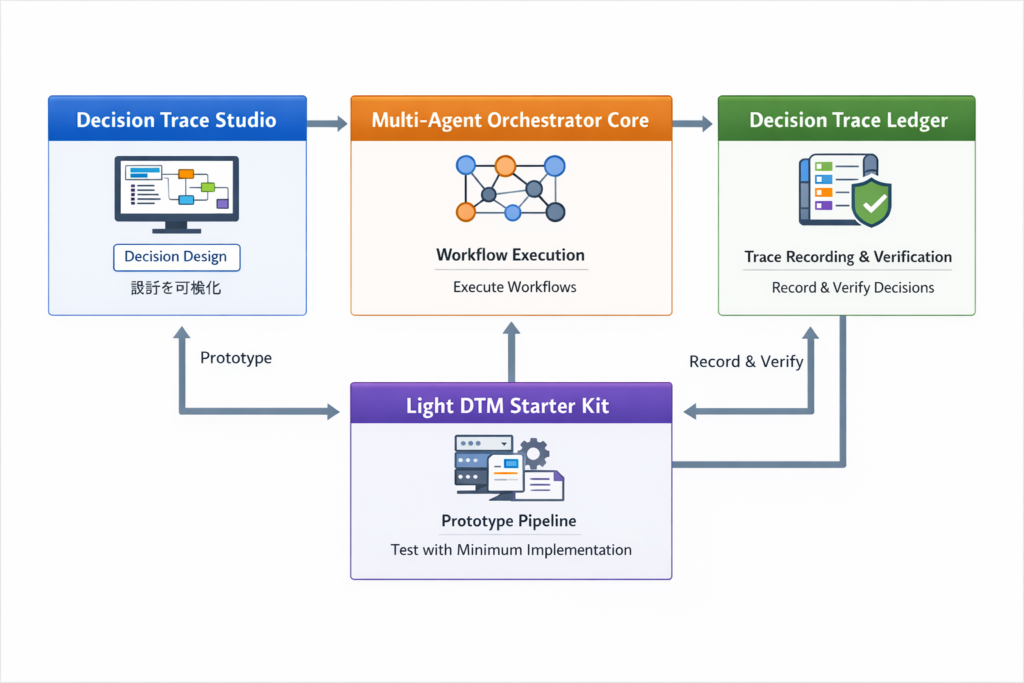
Overall Flow
- Design decisions in Studio
- Test with Starter Kit
- Execute via Orchestrator
- Record with Ledger
Step-by-Step Implementation
Step 1: Visualize decision structure in Studio
Define:
- Event
- Signal
- Decision
- Boundary
- Human
- Log
At this stage:
No AI or agents are required
Step 2: Build minimal pipeline (Starter Kit)
Convert to:
Signal → Decision API
Goal:
Input → Decision output works
Step 3: Convert to Orchestrator DSL
Map:
- Decision → decision node
- Branch → condition
- Constraint → boundary
- External process → action
- Human → human_gate
Key insight:
MAS is not about agents first — it is about executable decision structure
Step 4: Connect external systems via action nodes
Examples:
- CAE simulation
- Material DB
- PLM / ERP
- Document generation
- External AI
Step 5: Structure human intervention
Examples:
- Approval only if safety factor deviates
- Review only if cost exceeds threshold
Result:
Human-in-the-loop becomes a design asset
Step 6: Record decisions with Ledger
Record:
- Event
- Signal
- Decision
- Boundary
- Human
- Action
- Output
This enables:
- Reproducibility
- Auditability
- Explainability
Step 7: Return to Studio for improvement
Analyze:
- Bottlenecks
- Over-restrictive boundaries
- Excessive human intervention
- Where AI should be added
This creates the loop:
Design → Execute → Log → Improve
One-Line Summary

- Studio → Design decisions
- Starter Kit → Test minimal pipeline
- Orchestrator → Execute workflows
- Ledger → Record and verify
Together:
Decision Trace Model becomes a real system
Conclusion
Decision Trace Studio is not just a design tool.
It is:
An environment for designing decisions
The real value is:
Turning designed decisions into executable systems
This shifts thinking from:
Designing processes
to:
Designing, executing, logging, and improving decisions
As a result:
Technical documents are no longer static artifacts,
but outputs generated from reproducible decision structures.
And the starting point of this transformation is:
Decision Trace Studio

AIシステム設計・意思決定構造の設計を専門としています。
Ontology・DSL・Behavior Treeによる判断の外部化、マルチエージェント構築に取り組んでいます。
Specialized in AI system design and decision-making architecture.
Focused on externalizing decision logic using Ontology, DSL, and Behavior Trees, and building multi-agent systems.